





What is VESA?
VESA is the standard hole pattern on the back of a display, measured in millimetres between the mounting holes. A display listed as 400×400 has holes 400 mm apart horizontally and vertically. Match that pattern and any compliant mount will fit, whatever the brand.
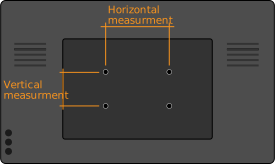
Enter the horizontal and vertical measurements in millimeters to calculate the VESA size.
VESA Size Calculator
How to measure your display
Measure centre to centre between the mounting holes on the back of the panel, in millimetres. Horizontal first, then vertical. Measure the holes, not the edges of the display, and ignore any holes used for a stand rather than a mount. If the pattern is rectangular rather than square, both figures matter.
Common VESA mount sizes (MIS-B through MIS-F)
The Flat Display Mounting Interface defines hole patterns in millimetres, horizontal × vertical. Larger displays use wider spacing so the load is spread across more of the panel back.
VESA MIS-B (Variant B)
Small panels and monitors, typically under 8 kg.
- 50×20 mm
VESA MIS-C (Variant C)
Small panels, typically under 14 kg.
- 75×35 mm
VESA MIS-D (Variant D)
The most common monitor pattern, roughly 12–23 inch displays.
- 75×75 mm
- 100×100 mm
VESA MIS-E (Variant E)
Mid-size displays, roughly 23–31 inch.
- 200×100 mm
- 200×200 mm
VESA MIS-F (Variant F)
Displays from about 31 inch upward. Square patterns in 100 mm increments.
- 200×200 mm
- 300×300 mm
- 400×400 mm
- 500×500 mm
- 600×600 mm
- 700×700 mm
- 800×800 mm
- 900×900 mm
- 1000×1000 mm
The pattern is not the weight limit
A VESA pattern describes hole spacing and nothing else. Two displays sharing 400×400 can differ by tens of kilograms, and the standard says nothing about which a given mount can carry. Check the mount’s load rating against the real weight of the installation, including the enclosure, camera, codec or media player fixed to it. On motorised and height-adjustable stands the load limit matters more again, because the weight moves.
When the pattern does not match
Not every display follows the standard. Consumer televisions often use their own spacing, and dvLED walls define no VESA pattern at all. A VESA adapter plate bridges the display’s own fixing points to a pattern the mount accepts. For dvLED, panel-specific mounts exist instead, built to a given manufacturer’s cabinet rather than to a hole pattern.
Frequently asked questions
How do I measure my display’s VESA size?
Measure the distance between the mounting holes on the back of the display, centre to centre, in millimetres. Measure horizontally first, then vertically. A pattern written as 400×200 means 400 mm across and 200 mm down. Measure the holes themselves, not the edges of the panel.
What does VESA stand for?
VESA is the Video Electronics Standards Association. The mounting standard is properly called the Flat Display Mounting Interface, or FDMI, but in everyday use "VESA" refers to the hole pattern on the back of a display.
What if my display has no VESA pattern, or an unusual one?
Many displays, particularly consumer televisions and some large-format panels, use non-standard hole positions or none at all. A VESA adapter plate bridges the display’s own fixing points to a standard pattern the mount can accept. Manufacturer-specific mounts also exist for dvLED walls, where no VESA pattern is defined at all.
Does the VESA pattern tell me the weight limit?
No. The pattern describes hole spacing only. Weight capacity is set by the mount, not the standard, and a display can share a pattern with a much heavier one. Always check the mount’s stated load rating against the display’s actual weight, including any enclosure, camera or media player fitted to it.
Is a larger VESA pattern always better?
No. The pattern must match what the display provides. A wider spacing spreads load over a larger area, which is why big displays use it, but fitting a mount with a larger pattern to a display that does not have it requires an adapter rather than force.
What is the difference between MIS-D, MIS-E and MIS-F?
They are size classes within the same standard. MIS-D covers 75×75 and 100×100 mm and suits monitors. MIS-E covers 200×100 and 200×200 mm for mid-size displays. MIS-F covers 200 mm and above in 100 mm increments, and is what large-format and professional signage displays use.
